Google Ads Budget Pacing Is Changing — What You Need to Know Before June 2026
Starting June 1, 2026, Google Ads is changing how budgets are distributed when ad scheduling is active. Until now, budget would often be left over when delivery was limited; from now on, Google will try to spend the full monthly budget within the available hours. For B2B companies and lawyers who only advertise during business hours, this can mean significantly higher daily spend.
Google has officially set the date to June 1, 2026. The change was originally floated for March, but the date is now fixed. If you haven’t reacted yet, you’ve got a few extra weeks to adjust.
If you only run your campaigns on weekdays or during certain hours, you’ve probably noticed this: at the end of the month, your total spend sits significantly below the theoretical maximum of daily budget × 30.4. That’s because Google has only counted the days your ad schedule is actually active. On a “Mon to Fri” ad schedule, that’s roughly 22 days per month instead of 30.4.
That’s about to change. Starting June 1, 2026, Google will try to spend the full monthly budget regardless of how tight your ad schedule is.
How does the new budget pacing work from June 2026?
Starting June 2026, Google Ads will adjust budget distribution. For campaigns with ad scheduling, the system will actively try to spend the full monthly budget (30.4 × daily budget), regardless of how tight your ad schedule is. Ads still only run during the scheduled times, but within those times, spend will be far more aggressive than before. The billing caps stay unchanged: up to 2× the daily budget per day and 30.4× per month.
Until now, Google has multiplied your daily budget by the number of actually active days in your ad schedule. On a typical Mon-Fri setup, that was around 22 days per month. The target monthly budget therefore sat well below the theoretical maximum of daily budget × 30.4.
The new behavior flips that logic. Google now always takes the full monthly budget (daily budget × 30.4) as the target and distributes it across the available hours, no matter how narrow the schedule is. The main points:
- Your ads still don’t run outside the scheduled times. The ad schedule is respected. No ads at 10 PM if you’ve set the schedule to 8 AM to 5 PM.
- The existing spend caps still apply: maximum 2× the daily budget on any single day. The monthly cap stays at 30.4 × daily budget.
- Spend gets concentrated inside your scheduled times, which means more budget per available hour, stronger auction participation, and potentially higher CPCs.
Which businesses are most affected?
This change is mostly relevant for businesses that intentionally use restricted ad schedules. And in B2B and professional services, that’s a lot of advertisers.
Law firms often only advertise during business hours, because calls outside those hours can’t be answered. A typical schedule is Monday to Friday, 8 AM to 6 PM — that’s 50 out of 168 weekly hours, less than a third.
B2B service providers have similar setups. Anyone relying on phone or chat contact restricts delivery to availability hours. Some also only run on weekdays.
Contractors and trades with limited budgets often plan their ads around the core hours when inquiries are most likely.
For all these setups, the tighter the schedule, the more the change will hit.
Per Google, the change does not apply to Local Services Ads and certain other campaign types. If you only run LSA, nothing changes for you. For standard Search, Display, Performance Max, and Demand Gen campaigns with ad scheduling, the new logic applies in full.
The change affects every campaign with an active ad schedule, regardless of bidding strategy. But with Smart Bidding (Target CPA, Target ROAS, Maximize Conversions), there’s an additional effect: the system will bid more aggressively to spend the budget inside the available hours. That can push CPCs up faster than with manual bidding.
Why has Google been spending less until now?
The previous under-delivery wasn’t a bug, it was a consequence of how Google calculates budgets internally. The pacing system was based on the number of actually active workdays in the schedule. On Mon-Fri, that was roughly 22 days per month instead of the 30.4 days in the theoretical monthly max.
Google has now identified this as a problem, especially because advertisers complained that their set budget wasn’t being spent. The new logic, per Google’s announcement, is meant to ensure that monthly spend targets are reached regardless of the ad schedule.
That sounds fair at first. But it has consequences that aren’t immediately obvious to everyone.
How much more will the new budget logic cost in practice?
The obvious consequence: your campaigns will spend more starting June than they did before, provided they had a restricted ad schedule and weren’t already burning through the full theoretical monthly budget.
How big the difference gets depends on the ratio between active workdays and the 30.4 days per month. On a Mon-Fri schedule, that’s about 8.4 days less than 30.4. That gap gets multiplied by your daily budget. The example below shows typical setups, like the ones common at law firms, B2B service providers, and contractors.
| Daily budget | Ad schedule | Before (~22 workdays) | From June 2026 (×30.4) | Extra cost/month |
|---|---|---|---|---|
| €30 | Mon–Fri | ≈€660 | ≈€912 | +€252 |
| €50 | Mon–Fri | ≈€1,100 | ≈€1,520 | +€420 |
| €100 | Mon–Fri | ≈€2,200 | ≈€3,040 | +€840 |
| €30 | daily | ≈€912 | ≈€912 | ±€0 |
The numbers are based on Google’s confirmed pacing logic (daily budget × number of active workdays) compared to the new logic (daily budget × 30.4). A standard month has 30.4 days, on average 22 of which are workdays. The 8.4-day gap will close starting June. Anyone who had even more under-delivery in practice (below 22 workdays) will see an even bigger difference from June onward.
Beyond that, there are subtler effects. When all advertisers with restricted schedules suddenly bid more aggressively during the same hours, competition rises in exactly those time windows. The result is higher CPCs, especially during peak hours.
For industries with high competition anyway — lawyers, insurance, IT services — that can become noticeable. When several competitors want to spend more budget in the same time window, auction prices get pushed up.
Whether this ends up positive or negative for your performance depends on how well your campaigns convert. More spend in a limited time window means more visibility, but also higher cost per click.
What you need to adjust before June 1, 2026
Review all campaigns with active ad scheduling. Compare your current daily budget against your actual monthly spend. If budget regularly went unused before, that’s about to change, and you should decide whether you want that.
Check your daily budget
Do the math: your daily budget × 30.4 equals the maximum monthly budget. If that number is higher than what you want to spend per month, adjust the daily budget down.
Analyze your previous spend
Look at how much your campaigns actually spent over the last three months. The difference between the theoretical monthly budget and real spend tells you how much extra could flow starting June.
Watch performance after the cutoff
In the first two weeks after the switch, keep a closer eye on CPCs and daily spend. If cost per conversion rises without the lead quality improving, a budget adjustment is in order.
If you’ve been intentionally working with under-delivery (setting a higher daily budget because you knew it wouldn’t be fully spent), you now need to rethink. From June, the daily budget becomes the real control lever. Set it to the amount you actually want to spend per day, divided by the days your campaign runs.
Adjust budgets now instead of getting surprised in June
The budget pacing change isn’t a dramatic shift, but it specifically hits the campaign setups most common at SMBs. If you only advertise during business hours, you had an unofficial budget buffer. That’s gone now.
The good news: you still have time to prepare. If you review your budgets now and adjust where needed, you avoid unnecessary extra spend.
- Identify ad schedules. Check which of your campaigns use a restricted schedule, via “Ad schedule” in campaign settings.
- Recalculate monthly budget. Daily budget × 30.4 = your new real monthly budget from June. Does that number match your plan?
- Adjust the daily budget. If needed, reduce the daily budget so the resulting monthly budget matches your intended amount.
- Watch performance from June. Keep CPCs, daily spend, and cost per conversion under closer review for the first two weeks.
GML 2026 adds: Demand-led Budget Pacing as a new option
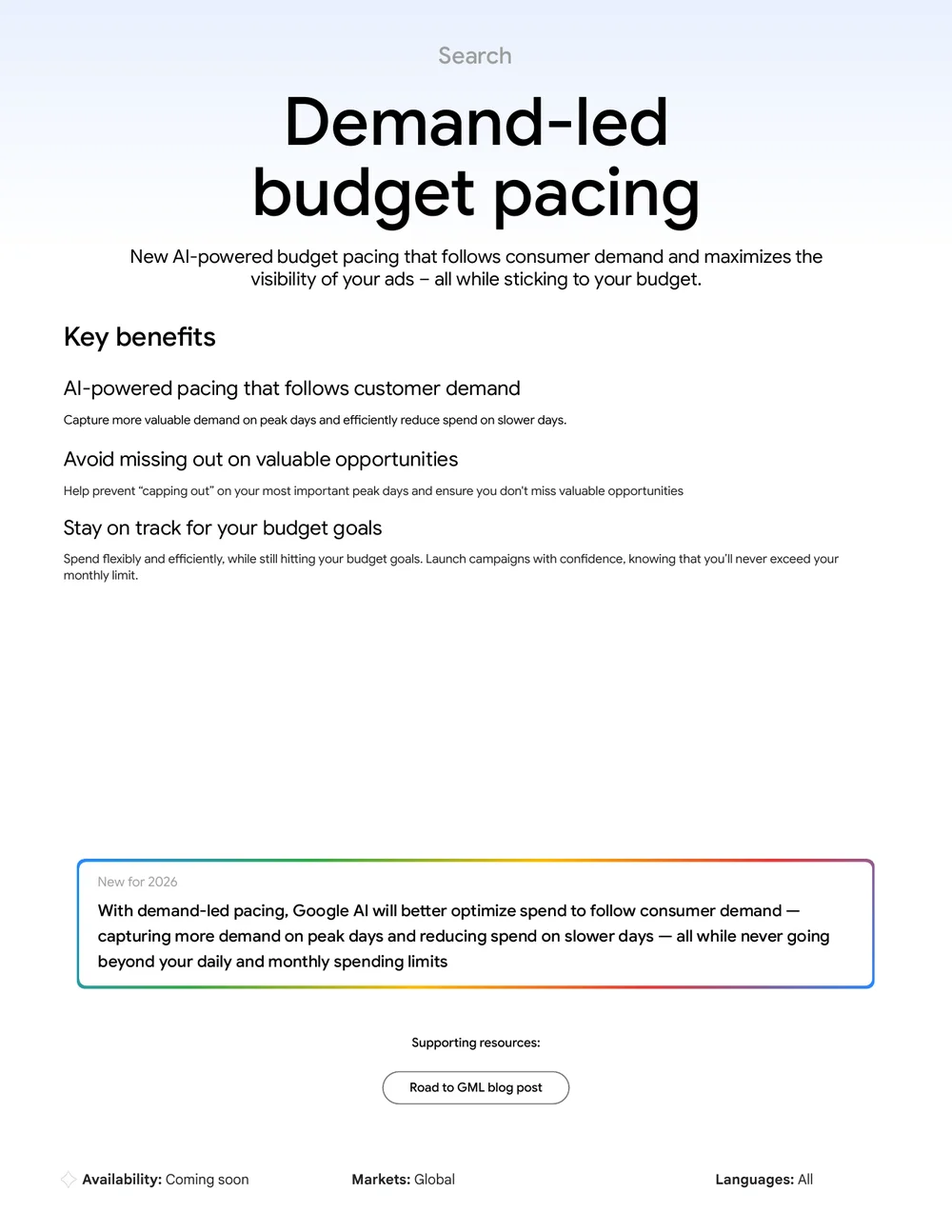
Right after the ad schedule change, the next pacing topic comes out of Google. At Google Marketing Live on May 20, 2026, Google announced an additional pacing model called “Demand-led Budget Pacing.” Status: “Coming soon,” globally available, all languages. Google hasn’t named a concrete rollout date yet.
The idea: instead of distributing budget evenly across days, the system looks at expected demand and spends more on strong days, less on weak ones. Example: if Thursday historically brings twice the inquiries of Monday, Thursday gets paced higher accordingly, without you manually adjusting the daily budget. Daily and monthly caps remain.
My take: sounds like a logical next step after the ad schedule change. But until Google shows how conservative the pacing really is, I wouldn’t activate it blindly. On small accounts with tight budgets, an aggressive demand forecast can quickly create unintended spikes. Probably useful for accounts with clear seasonal patterns, less so for always-on lead gen on small budgets.
Frequently asked questions on the budget pacing change
When does the new Google Ads budget pacing rule take effect?
The change officially takes effect on June 1, 2026. It was originally announced for March 2026, but Google moved the date back to June 1 in its April announcement.
Will my daily budget be doubled by the new rule?
No. The daily budget stays the same. What changes is the distribution over the month. The system will now spend the full monthly budget (30.4 × daily budget) even when your ad schedule limits delivery to a few hours. On any single day, the cap stays at 2× the daily budget.
Which campaign types are exempt from the change?
Local Services Ads (LSA) and a few other campaign types are exempt. For standard Search, Display, Performance Max, and Demand Gen campaigns with active ad scheduling, the new logic applies fully.
Do I need to lower my daily budget to avoid extra costs?
Only if your current daily budget × 30.4 ends up higher than what you actually want to spend per month. If you’ve been intentionally working with under-delivery and set a higher daily budget, you should adjust it down before the new rule kicks in.
What happens if I do nothing before June 1, 2026?
Your campaigns will tend to spend more than before. On a typical setup with a €30 daily budget and a Mon-Fri 8 AM to 6 PM schedule, that can mean up to €332 in extra monthly cost. The exact impact depends on your specific ad schedule and competition in your industry.
More details on the original announcement at Search Engine Roundtable.
Need a fresh pair of eyes on your Google Ads account?

Benjamin Häntzschel
Google Ads, AI & Conversion Optimization